

I recently wrote about a way to skip repeated rebuilds of internal packages during local development in a monorepo:
https://ramblings.nithinrdy.com/p/creating-a-nodejs-monorepo
I figured I’d take a step back and write about how one would set up a NodeJS monorepo to begin with — or at least, the way I set one up last year.
But why a monorepo?
If you’ve looked up this article you likely already have your own reasons so feel free to skip this section. There are several benefits:
- If you wish to update, let’s say, an API (so you’d have to change an endpoint, and how consumers of the API use said endpoint) — it’s much easier to coordinate such a change with one PR (in a monorepo) as opposed to multiple PRs targeting multiple parts of the application across different repos.
- If you’re using TypeScript in particular, shared types for use across the various parts of the app can really help speed things up during development.
- Helps with centralising your dependencies, so every layer of your app uses the exact same version of everything, a simple way to prevent tiny version-mismatch related headaches.
- In my particular case, we already had a relatively-mature Vite React App that served as the main application. I was tasked with constructing a separate public-facing NextJS app. After realising that a lot of the UI used similar (if not the exact same) components, the choice to set up a monorepo became a no-brainer. I was able to pluck out out a huge set of UI components, the styling configuration (Tailwind + PostCSS), icon components, and more into shared packages, leaving the Vite and NextJS apps as consumers of said packages.
The sheer amount of code that I was able to NOT write and instead just re-use was simply… beautiful… sniff… sorry where was I? Oh yes, monorepos, let’s create one.
What you’ll need
To keep things consistent with the other article, I’ll stick to the exact same toolset here:
- Yarn workspaces to manage each of the individual repos as… separate workspaces (you can alternatively use pnpm, etc.),
- Turborepo to create dependency chains and orchestrate building of the constituent apps and packages,
- Syncpack to ensure packages across repos remain in sync (optional but recommended, super helpful when managing dependencies),
And… that’s about it, the only other things you need are your apps and packages that presumably are all living separately at the moment (or maybe it’s all in one monolithic package, and you wish to split it into separate app(s) and package(s) as you’re creating the monorepo).
You will need to uniform-ize the package.json script names by the time we get to the step “3. Adding Turborepo” (for example, you can’t have the dev script be called “start” in one app, and “serve” in another package).
For the sake of this example I’ll generalise all package.json scripts (dev means dev/start/serve/run/whatever-you’ve-named-your-dev-script, and build means build/whatever-you’ve-named-your-build-script, so on).
Creating the monorepo
If you’re enjoying the post, please consider following me (here or on Twitter or Bluesky!) :)
1. Getting Started
Let’s start by defining some goals. In my case, I had a single Vite React app and was tasked with creating a NextJS app: I decided to set up a mono-repository for this because they would have had a whole bunch of common components, icons, etc. Aaand.. go!
I envisioned this structure:
- App 1: The main Vite React app, depends on packages 1, 2 and 3.
- App 2: The NextJS app, depends on packages 1, 2 and 3.
- Package 1: Icons used across both apps. No dependencies.
- Package 2: Shared UI components (buttons, cards, tiles and the like). Depends on package 1.
- Package 3: A shared tailwind-config. No dependencies.
Here’s a visualisation (same scenario as the previous post):
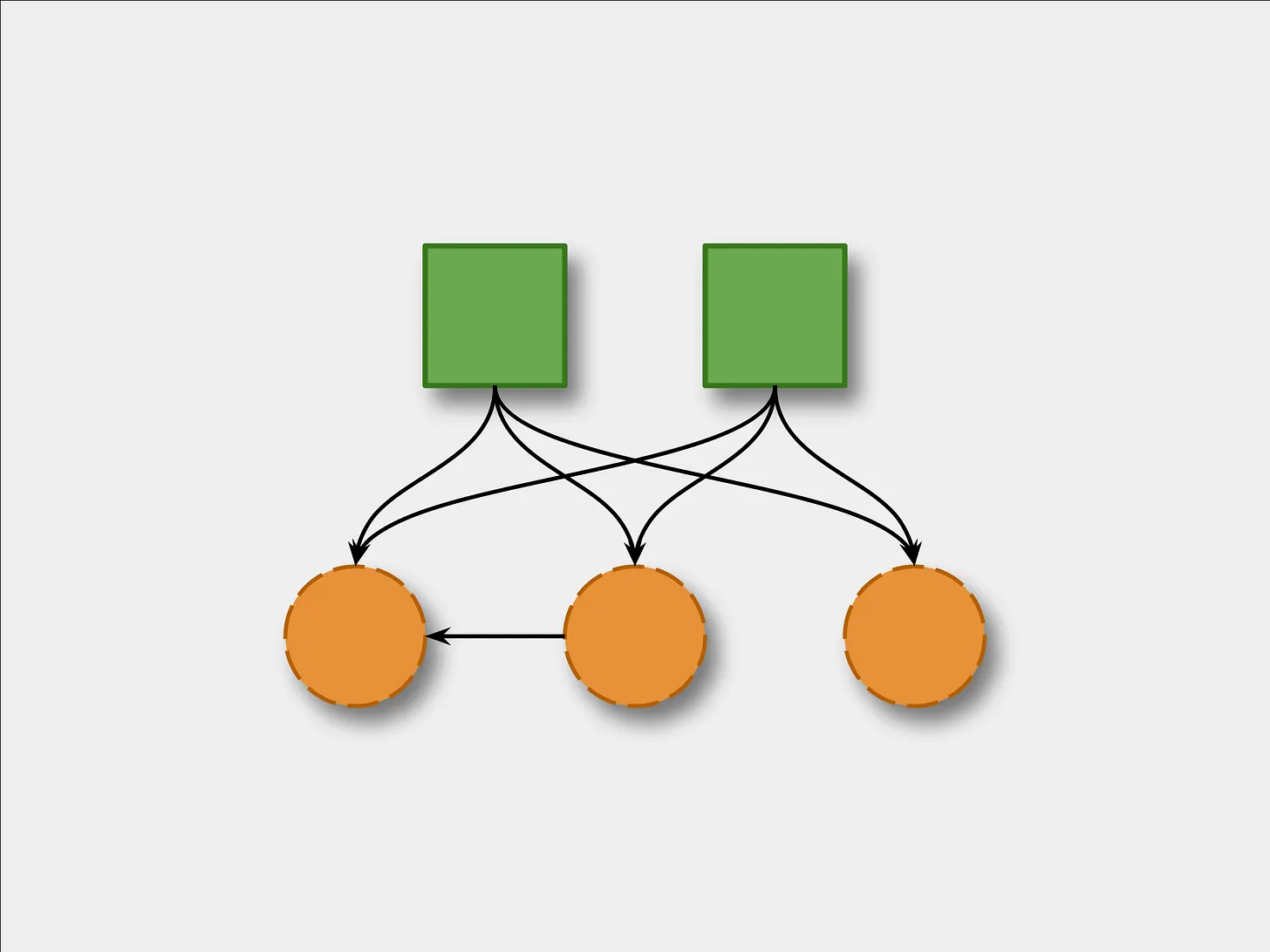
Apps 1 and 2; packages 1, 2 and 3.
Wait, are you saying the UI package (2) doesn’t depend on the tailwind-config package (3)? Doesn’t the UI need tailwind for styling?
Well yes, but the tailwind styles and config that the UI requires must come from the consuming parent app itself.
So even though the two apps and the UI package use tailwind within themselves, only the apps must import the tailwind-config: and then they both use the UI package as needed, letting the package derive the necessary styling from its corresponding parent app.
The folder structure is a good place to start. From the root, here’s what I wanted it to look like:
apps/vite-app/next-app/
packages/ui/tailwind-config/icons/
.gitignore.syncpackrc.json(Syncpack config to maintain package versions)package.jsonturbo.json(orturbo.jsonc,jsoncallows comments in JSON)yarn.lockREADME.md
Of course, each app/package will have its own package.json, .gitignore, etc. The root ones are to manage the monorepo itself.
2. Project structure and workspaces
Let’s look at the root package.json. This will contain the Yarn-specific monorepo config, global-level commands and stuff like that. Here’s a rough skeleton:
{
  "name": "monorepo", // <-- remember this part, name of the root package
  "version": "0.0.1",
  "packageManager": "yarn@x.y.z",
  "type": "module",
  "private": true,
  // Likely won't need this, optional: https://yarnpkg.com/configuration/manifest#resolutions
  "resolutions": {
    "@types/react": "^a.b.c",
    "@types/react-dom": "^a.b.c",
  },
  "devDependencies": {
    // will contain turbo and syncpack once we add them
  },
  "scripts": {
    // We'll come back to this
  },
  // The important part: this array tells yarn "any package that fits these glob patterns is a workspace in this monorepo."
  // Since I split my packages up as "apps" (2) and "packages" (3), and will be creating such directories
  // to place them in, that's what I've written here.
  "workspaces": [
    "apps/*",
    "packages/*"
  ]
}
Let’s start shaping the project. Both apps go into apps/, all the packages go into packages/.
In case you are also actively splitting a monolith app into apps & packages as you’re crafting this monorepo, it might be easier to create only 1 app and 1 package and get them to work first.
Then incrementally add the remaining packages (which you will presumably extract from the now-added monolith) afterwards, one-by-one.
Create
apps/andpackages/in the root of the project.For each separate app/package you wish to have, pick it up as it is and plop it down into the right directory. Now inside the app/package you just placed:
- Delete
node_modules/andyarn.lock(orpackage-lock.json). - Change
“name”inpackage.jsonto@<name_of_root_package>/<name_of_app_or_package>(for example,@monorepo/my-package). Note: I like to append-appto the names of apps because the names appear in various configs, makes it easier to differentiate (soeditor—>@monorepo/editor-app).
- Delete
Repeat for all apps and packages.
Wherever a package is imported by an app/package make sure the new name is used, now that the packages all live together. For example, for
vite-app(now@monorepo/vite-app)’spackage.json:"devDependencies": { "@monorepo/icons": "1.0.0", "@monorepo/tailwind-config": "1.0.0", "@monorepo/ui": "1.0.0", // ... }and similarly for the import statements and stuff.
Now run a quick
yarnto re-install all the dependencies and you’re ready to test!
Wait, why did I have to delete node_modules/ and yarn.lock for each file?
In a monorepo, all packages share a single lockfile and node_modules/, at the root. When you just ran yarn, a new yarn.lock was created at the root, and a new node_modules/ was created:
at the root
and possibly within each package (these new ones are different from what the packages had before that we deleted)
Now here’s the crucial part, without Turborepo there is no “build orchestration” yet: Yarn doesn’t yet know which app(s) depend on which package(s).
We’ll add turborepo in the next step but this means, for now, if you run yarn dev on an app it will not work unless you first run yarn build on all the packages the app depends on, and all the packages that those packages depend on, and so on (Turborepo will make this a piece of cake… in a bit).
So for now pick an app, go down its dependency chain and, from the bottom, build each package. When you reach the top (i.e. back to the app), run dev and now you should have the app running!
3. Adding Turborepo
Make life a million times easier by letting Turbo manage dependency build chains. Turbo will let you
- run a single command (say,
yarn devonvite-app), and it will take care of preparing the shared package-dependencies before running the app. - cache the build outputs of the shared packages, making repeated builds a breeze (only rebuilds changes)
Now you should really, REALLY, read the official guide and take your time with it, but I’ll include a brief (but very linear) guide here.
To start, install Turborepo, both globally (curl -fsSL https://turborepo.dev/install | sh) and in the root (yarn add turbo --dev --ignore-workspace-root-check). Then add turbo.json. Finally add .turbo to .gitignore (turbo stores its cache here).
Once again, the official guide is the best for this, but here’s what the config looks like:
{
  "$schema": "https://turborepo.dev/schema.json",
  // Lets you configure a “task” (property-key = name of task).
  // Task is an entry in "scripts" of the "package.json" of apps/packages.
  "tasks": {
      // Task "build" means it applies to every single “build” script
      // in any package.json.
      // You can target a specific package’s task with <package_name>#<task_name>
      // (like @monorepo/vite-app#build).
    "build": {
      // dependsOn means before running "build" on any package P, first run "build" on all packages
      // that P depends on, then come back and P's "build"
      "dependsOn": ["^build"], // <-- obviously doesn't have to be the same ("build"), can be any task

      // these paths are checked to see if something changed when this task was run
      // if yes, the parent of this task is re-triggered
      // (if A depends on B: whenever B's "outputs" change, A is rebuilt)
      "outputs": ["dist/**"]
    },
    "dev": {
      "persistent": true, // long-running task (such as "dev")
      "cache": false // wouldn't want to cache "dev" task
    }
  }
}
For our example scenario, we’d have something like this:
{
  "$schema": "https://turborepo.dev/schema.json",
  "tasks": {
    "@monorepo/vite-app#build": {
      // inputs = "whenever these files change, this task is rerun"
      // $TURBO_DEFAULT$ = every file that isn't .gitignored
      "inputs": ["$TURBO_DEFAULT$", ".env"],
      "outputs": ["dist/**"],
      "dependsOn": ["^build"]
    },
    "@monorepo/next-app#build": {
      "inputs": ["$TURBO_DEFAULT$", ".env"],
      "outputs": [".next/**"],
      "dependsOn": ["^build"]
    },
    "@monorepo/ui#build": {
      "outputs": ["dist/**"],
      // Didnt have to target @monorepo/icons since thats the only dependency for
      // @monorepo/ui, so Turbo already knows, but just for the sake of example.
      "dependsOn": ["@monorepo/icons#build"]
    },
    "@monorepo/icons#build": {
      // no dependencies, no dependsOn needed
      "outputs": ["dist/**"]
    },
    "@monorepo/tailwind-config#build": {
      // "outputs" doesnt necessarily need to track built artefacts
      // it can also track only static files, meaning it'll never change, which is fine
      "outputs": ["theming.css", "postcss.config.js"]
    },
    "@monorepo/vite-app#dev": {
      // "#dev" depends on "build" because built artefacts exported by the
      // packages are used when importing, so build must run at least once
      // to guarantee they exist
      "dependsOn": ["^build"],
      "persistent": true,
      "cache": false
    },
    "@monorepo/next-app#dev": {
      "dependsOn": ["^build"],
      "persistent": true,
      "cache": false
    },
  }
}
Now you can run the required turbo tasks and enjoy the benefits Turbo brings! For example:
# NOTE: For all these, the tasks that are in the dependency chain are also run
# (in bottom-up order), that's the whole point of Turbo

turbo run dev # run dev task for all apps/packages that have it
turbo run dev --filter=@monorepo/vite-app # run dev for vite-app
turbo run build --filter=@monorepo/next-app # build next app
Remember this part when we were discussing the root package.json in “2. Project structure and workspaces”?
  "scripts": {
    // We'll come back to this
  },
To make things easier, add the most commonly run commands here:
  "scripts": {
    "dev:vite": "turbo run dev --filter=@monorepo/vite-app",
    "dev:next": "turbo run dev --filter=@monorepo/next-app",
    "build:vite": "turbo run build --filter=@monorepo/vite-app",
    "build:next": "turbo run build --filter=@monorepo/next-app",
    // ...
  },
And you can simply run, for example, yarn dev:vite from the root, and so on.
4. Adding Syncpack (optional, but highly recommended)
This will let you enforce consistent versioning for any package that are common across the monorepo, which’ll help you prevent unforeseen consequences due to version-mismatch bugs (pain to debug).
Simply add Syncpack as a root dev dependency (yarn add syncpack --dev --ignore-workspace-root-check) and add a basic .syncpackrc.json config, for example:
{
  "$schema": "./node_modules/syncpack/dist/schema.json", // valid at the time of writing
  "versionGroups": [
    {
      "dependencies": ["@monorepo/**"],
      "label": "Internal Packages"
    },
    {
      "dependencies": ["@types/**"],
      "label": "Type Definitions"
    },
    {
      "dependencies": ["**"],
      "label": "Rest"
    }
    // ...
  ]
}
and run syncpack lint (you can check out syncpack’s reference here). You can add syncpack commands to the root package.json like we did with the turbo run commands. You can also add them to something like Husky to run the check(s) pre-push or something like that.
Finishing up
1. Adding a new app/package
Any package with path matching the root package.json’s workspaces glob pattern array will be tracked by yarn. To see the list of existing workspaces run yarn workspaces info. To create a new app/package, simply place a package inside apps//packages/, i.e. a directory with package.json with at least the following:
{
  "name": "@monorepo/<name>",
  "version": "x.y.z",
  // ...
}
and then tie it up with Turborepo and that's all!
2. Installing an NPM package within a specific app/package
# If the dependency is already in use by a different workspace,
# try to install the same version as what's used everywhere else.
yarn workspace <workspace_name> add <package_name> # Run from root
3. Installing an NPM package at the root
yarn add abc --ignore-workspace-root-check # Run from root
4. While developing, I’m having to wait for my shared package(s) to fully rebuild every time I make a tiny change
Read my previous post!
https://ramblings.nithinrdy.com/p/creating-a-nodejs-monorepo
Thanks for reading! If you enjoyed this I’d really appreciate a follow (here or on Twitter and Bluesky)!
About the author
- A developer obsessed with TypeScript. You can find me on Bluesky @nithinrdy.
Comments
Join the discussionNo comments yet. Be the first to comment.
